Hosted KYC
Noxtica-hosted identity verification
Businesses use Noxtica to verify their customers' identity directly in the browser — no app install required.
You own the decision. We hand you the evidence.
- No app to install
- Signed webhooks and a status API
- A human review path
- Built for your team to decide
Identity checks your customers finish in a browser
Noxtica hosts the whole customer journey: the camera guidance, the document and selfie capture, the liveness step and the result screen. Your server creates a session and reads the outcome. Your customer never leaves a browser.
No app, no friction
The customer opens a link on a phone or a computer. There is nothing to install, and a computer user can continue on a phone with a QR code.
Your team decides
Document, face and liveness checks produce automated signals with reasons. A person in your organisation reviews them. Noxtica never approves anyone automatically.
Capture stays off your servers
The hosted page collects the evidence and uploads it sealed. Your server never receives the customer answers or the capture directly.
Every case is auditable
Each verification keeps its reasons, a versioned review record and an audit entry for every decision in your Backoffice.
One integration, two ways in
Create sessions from your backend with the API, or send one-time invitations from the Backoffice without writing code.
Provisioned for you
Identity verification is provisioned per tenant under controlled availability. Your account team confirms what applies to your organisation and jurisdiction.
From API call to outcome
The whole path has eight steps. Your server starts it and finishes it. The customer steps happen on the page Noxtica hosts.
Create a session
Your server calls the sessions API with your own opaque customer reference. The response carries a session id and a single-use link.
Send the link
Redirect the customer, open a new tab, send the link by email or message, or show it as a QR code.
Move to a phone if needed
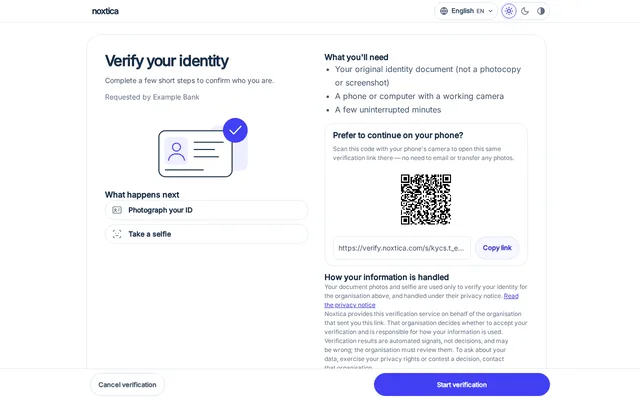
On a computer the hosted page offers a QR code and a copy-link option, so the customer can continue on a phone camera.
Capture the document
Live camera guidance helps with glare, blur, tilt and distance. The front is captured, and the back where the document type has one.
Take a selfie
A guided selfie is captured for the face comparison with the portrait on the document.
Complete the liveness step
A short guided sequence of head movements and a blink. The frames are re-checked on the server.
Review
Noxtica processes the submission. A finished capture waits in the review queue in your Backoffice until someone in your organisation records a decision.
Read the result
Your server reads the session status, or receives a signed event and then reads the status. Act on the status the read returns.
Where the data goes
Two paths, kept apart: your server talks to the Noxtica API with a server key, and the customer talks to the hosted page with a one-time link. Evidence goes from the customer browser to Noxtica. It does not travel through your servers.
What your customer sees
These screens come from the hosted flow with a synthetic specimen document and a synthetic face. No real person or identity document appears on this page.
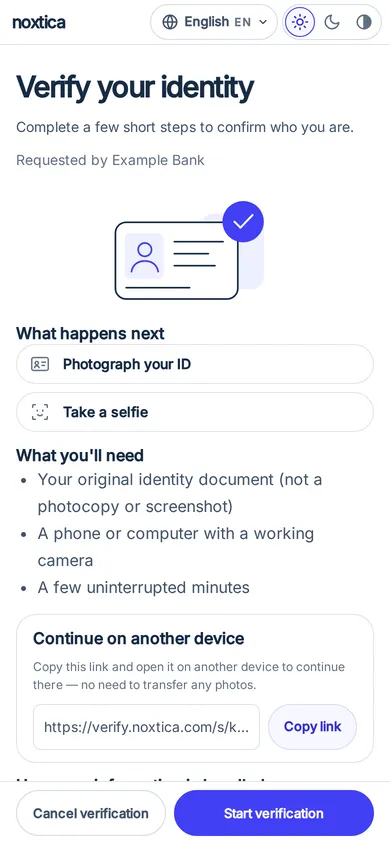
The business, the purpose and a plain start button. 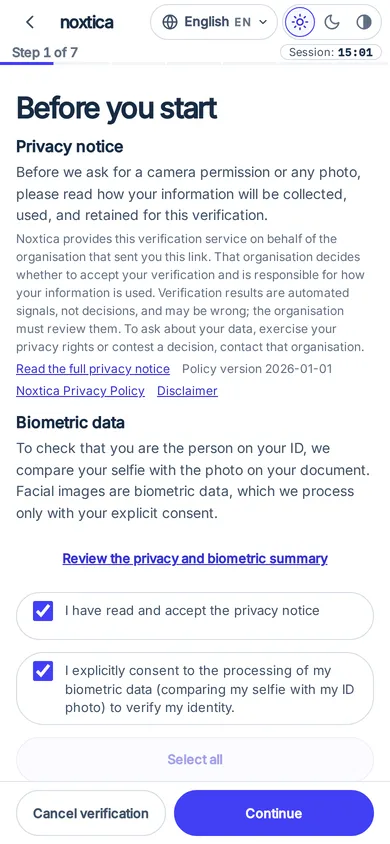
A privacy notice before anything is captured. 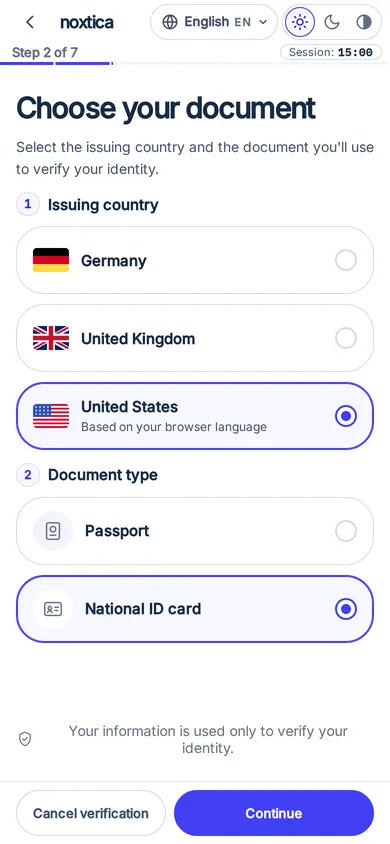
The customer chooses the document type and issuing country. 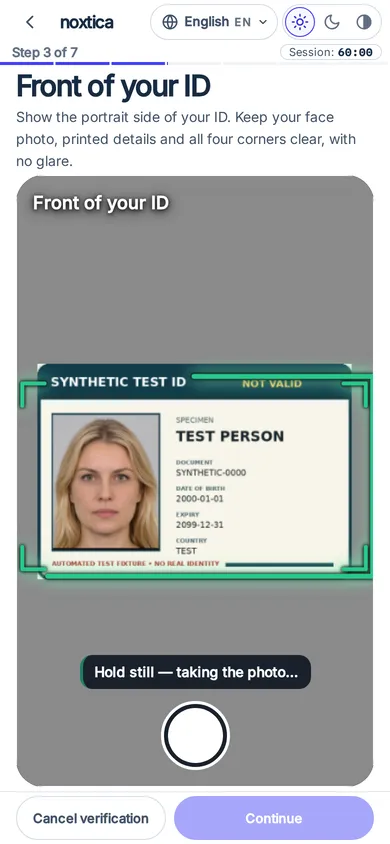
Live guidance on a synthetic specimen card. 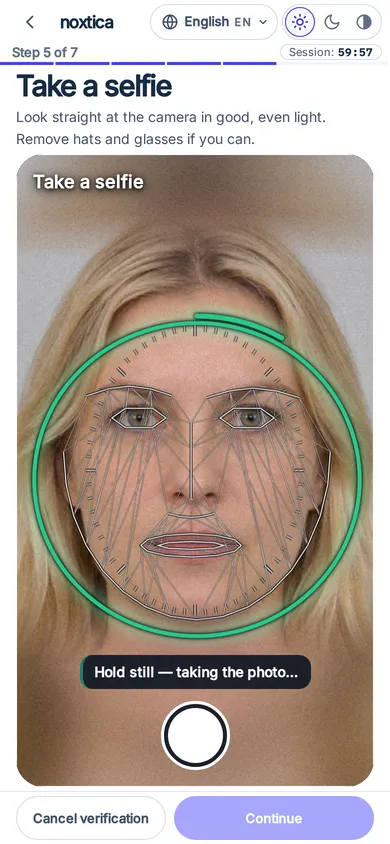
A guided selfie, shown with a synthetic face. 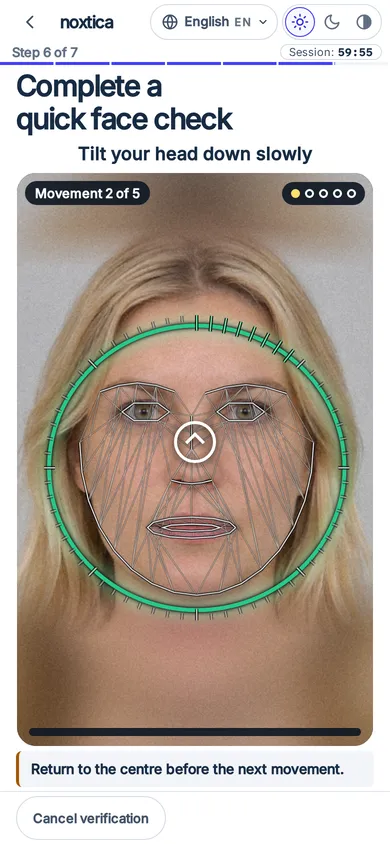
A short guided liveness sequence. 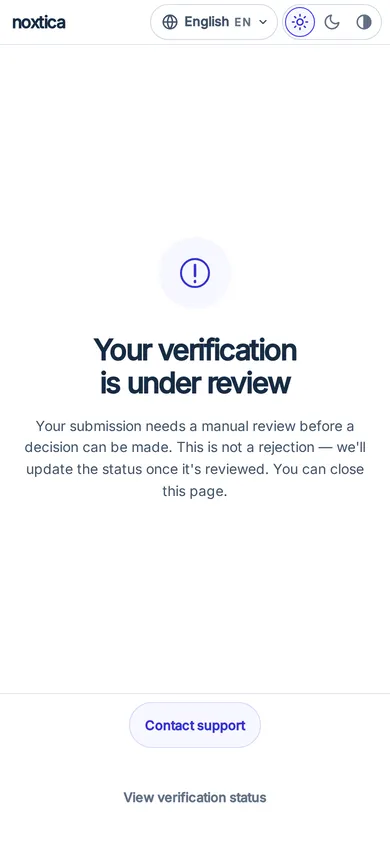
The result screen: under review, not an approval.
Accessible, in 36 languages
The page opens in the person's device language, with right-to-left layouts for Arabic, Persian and Hebrew. Light, dark and high-contrast themes, screen-reader labels, keyboard support and reduced motion are built in.
Supported documents and countries
- Passport
- National ID card
- Driving licence
- Residence permit
You choose which of these four document types each verification accepts. A passport is captured as its data page. The other three are captured front and back.
Issuing countries are configured per account, not fixed in a public list, and the customer sees country names in their own language. Ask us about the markets you serve before you promise coverage to your customers.
Optional extra steps apply only where they are enabled for your organisation.
What the checks look at
Every check below produces evidence for your reviewer and for your own risk rules. None of them is a decision.
Document checks
The document is read, its type is classified, and the machine-readable zone is validated where the document has one. Signs of a re-photographed screen or a printout are looked for, and a photo that does not show an identity document is flagged for a retake.
Face match
The portrait on the document is compared with the selfie. A weak match is reviewer evidence. It is not an automatic rejection of the person.
Liveness
A guided sequence of head movements and a blink shows the requested movement happened. The frames are re-checked on the server, and the browser can only make a result worse, never rescue a failed check.
Presentation-attack signals
Presentation-attack detection is advisory. Noxtica reports its result and never lets it decide. The score is information, not a live or spoof verdict, and it keeps the case in review.
No fully automated approval
Noxtica never turns a set of check results into an approval. The automated run ends with the case waiting for a person in your organisation.
Only completed is an approval. Treat every other status as not approved until you have read a later one.
No check result, however good, makes a hosted verification verified by itself.
Do not auto-reject on review. Review means no confident answer, a person should look.
Statuses your server can read
pending- The session exists and the link has not been opened.
opened- The customer opened the link.
verifying- The submission is being processed.
review_pending- Processing finished and a decision is needed in your Backoffice review queue. Not a rejection, and not an approval.
completed- A decision approved the session.
unverified- Processing finished with a negative outcome.
error- Processing could not finish, because of a fault or a refusal.
expired- The link or the time to finish ran out.
Your reviewers
A finished capture waits in the KYC review queue in the Backoffice. An administrator selects Approve or Override, and either completes the session. Record escalation leaves it as it is. Decisions need the administrator role and a step-up check, and each one writes a versioned review record and an audit entry.
For developers
Two calls and one event. Everything below is synthetic: the key, the ids and the customer reference are examples.
curl -X POST https://collect.noxtica.com/v1/kyc/sessions \
  -H "Authorization: Bearer sk_prod_EXAMPLE_NOT_A_REAL_KEY" \
  -H "Content-Type: application/json" \
  -H "Idempotency-Key: 7d9e2c64-example-0001" \
  -d '{
    "subjectRef": "cust_4821",
    "purpose": "Open your account",
    "returnUrl": "https://merchant.example.com/kyc/return"
}'{
"ok": true,
"sessionId": "3fa85f64-5717-4562-b3fc-2c963f66afa6",
"url": "https://verify.noxtica.com/s/<one-time-token>",
"expiresAt": 1790762445000,
"requestId": "req-example"
}curl https://collect.noxtica.com/v1/kyc/sessions/3fa85f64-5717-4562-b3fc-2c963f66afa6 \
-H "Authorization: Bearer sk_prod_EXAMPLE_NOT_A_REAL_KEY"
# { "ok": true, "session": { "status": "review_pending", ... } }POST /your/webhook (headers: X-Noxtica-Signature, X-Noxtica-Timestamp,
X-Noxtica-Event, X-Noxtica-Delivery)
{
"id": "3fa85f64-5717-4562-b3fc-2c963f66afa6:wh_example",
"type": "kyc.session.completed",
"created_at": 1790762445000,
"tenant_id": "t_example",
"data": {
"schemaVersion": "1",
"sessionId": "3fa85f64-5717-4562-b3fc-2c963f66afa6",
"status": "completed",
"verificationId": "9b1c4e52-example-verification",
"reasonCodes": [],
"occurredAt": 1790762445000,
"deliveryId": "3fa85f64-5717-4562-b3fc-2c963f66afa6:wh_example"
}
}import { createHmac, timingSafeEqual } from 'node:crypto';
// HMAC-SHA256 over `${timestamp}.${rawBody}`, sent as "sha256=<hex>".
export function isValid(secret, timestamp, rawBody, header) {
const expected = 'sha256=' + createHmac('sha256', secret)
.update(`${timestamp}.${rawBody}`).digest('hex');
const a = Buffer.from(expected);
const b = Buffer.from(header);
return a.length === b.length && timingSafeEqual(a, b);
}Good to know
- Send an Idempotency-Key header and a retry returns the same session without exposing the link again.
- A signed event is a notification, not authority. Verify it, record the delivery id, then read the session status and act on that.
- Events never carry your customer reference, a name or a document value.
- The return link must use a host registered for your organisation. Poll the status with a growing delay, because rate limits apply.
Data protection
What follows is how the product behaves today, in the words of the public documentation. For the legal terms read the privacy policy, the data processing addendum and the subprocessor list.
Consent first
Before the camera opens, the hosted page shows a privacy notice with your business name, the purpose and your privacy link. An authorised person in your organisation records the legal basis first, and until it is recorded session creation is refused.
Sealed in the browser
Photos and video frames are encrypted in the customer browser before upload and used only for that verification. Original media stays sealed in the Backoffice.
Isolated by tenant
Every session and every read belongs to one organisation. A status read for a session that belongs to another organisation returns not found, exactly like an unknown id.
Controlled access to evidence
Only administrators open original evidence, each open needs a step-up check and is audited, and a view is blocked if its audit entry cannot be written. Other roles see findings and measurements, not originals.
No personal data in events
Webhook events carry ids, statuses and reason codes. They do not carry names, document values or your customer reference.
Short-lived links
A link that is never opened expires with its session. After the customer first opens it, the time to finish is limited, and a session waiting for review does not expire while it waits.
Retention and deletion
Noxtica does not delete KYC verification details or evidence automatically, and it sets no retention date for them. They stay in your tenant until a tenant administrator deletes them.
An administrator deletes a verification in the Backoffice with a reason, a typed confirmation and a step-up check. Deleting removes the verification, its sessions, evidence files and records, and review decisions. It cannot be undone. Billing usage records, legal-basis receipts, the opaque customer reference and the audit trail remain. No server API key can delete a verification.
Data-subject erasure runs as a request in the Backoffice: a different administrator approves it, a legal hold blocks it, each item leaves a receipt, and a signed event reports the outcome without a subject id.
You own the notices, consents and legal basis for collecting identity evidence from your customers in each jurisdiction you serve. Noxtica is not a consumer reporting agency. Do not use the output for credit, insurance, employment or housing eligibility.
Beyond individuals: business and merchant verification
Business verification (KYB) and merchant onboarding (KYM). Available. Enabled for your account on request. The public KYB API is enabled per account.
Get started
Identity verification is provisioned per tenant. Talk to the team, confirm your use case and jurisdiction, and your account team provisions the module for you.
- Talk to the team about your use case and the markets you serve.
- Your account team provisions the module, and an authorised person in your organisation records the legal basis and the hosted-page settings in the Backoffice.
- Create a session with the API, or send a one-time invitation from the Backoffice.
Frequently asked questions
Does Noxtica approve or reject my customers?
No. Noxtica returns automated signals with their reasons, and a finished capture waits in your review queue. Only the status completed is an approval, and it appears after an administrator in your organisation approves or overrides.
Does the customer need to install an app?
No. The flow runs in a current mobile or desktop browser. On a computer the customer can scan a QR code to continue on a phone. Some in-app browsers are not supported, and the page then asks the customer to open the link in their own browser.
Which documents are supported?
Passports, national ID cards, driving licences and residence permits. You choose the types each verification accepts, and the issuing countries are configured per account.
How do I learn the result?
Read the session status from your server, or receive a signed event and then read the status. Act on the status the read returns, not on the event body.
Is liveness a proof that the person is real?
No. Liveness and presentation-attack results are reviewer evidence. Presentation-attack detection is advisory: the score is information, not a live or spoof verdict, and it keeps the case in review.
How long are the images and results kept?
Noxtica does not delete verification details or evidence automatically and sets no retention date. They stay in your tenant until a tenant administrator deletes them from the Backoffice.
Can I embed the hosted page in my own site?
The default is a full-page redirect or a new tab. The hosted page refuses iframe embedding unless framing is available for your organisation.
Can I turn identity verification on myself?
Not today. It is provisioned per tenant under controlled availability. Contact the team to discuss your use case and jurisdiction.
Are results legal proof of identity?
No. Results are probabilistic, can be wrong in either direction and are not legal proof of identity. A person in your organisation should review any adverse decision before it affects a customer.
Do you offer business verification?
Yes. Business verification (KYB) and merchant onboarding (KYM): available, enabled for your account on request.